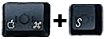
 at boot :-)
 As every FreeBSD enthusiast I wanted to see the Ports Collection working on Darwin as soon as I installed Mac OS X on my Powerbook. Darwin Ports makes this possible. You will be able to compile, install and package most (hopefully someday) of ports from the FreeBSD collection.
Since other similar projects seem to be shutting down or stalling, I'm rehashing my Darwin Ports effort. I just updated the tarball to use a recent FreeBSD ports distribution (7.2).
Darwin pkg is not required anymore to use Darwin Ports and it is deprecated.
Three steps to compile what you need from /usr/ports:
        $ cd
        $ curl -O ftp://ftp.freebsd.org/pub/FreeBSD/ports/ports/ports.tar.gz
        $ cd /usr
        $ sudo tar zxf ~/ports.tar.gz
        [...this will take a long time...]
	$ curl -O http://alice.iscanet.com/~rlucia/devel/darwin_pkg/files/darwin_ports-latest.tar.gz
	$ tar zxf darwin_ports-latest.tar.gz
	$ cd darwin_ports
	$ sudo bsdmake install
        $ cd /usr/ports/irc/ircII
	$ sudo bsdmake
        $ sudo bsdmake install
Darwin Ports will allow you to compile your ports using a Makefile infrastructure that give the "ports collection" a coherent environment to be built and packaged. Darwin Ports works with Apple provided bsdmake and compiler tool chain and the Darwin pkg tools (a port of FreeBSD's /usr/sbin/pkg_* tools to Darwin 10.2).
As a ports user you will need a compiler (everything is packaged in the Apple Developer Tools bundled with your Mac OS X copy) and a bunch of tools you'll find on this website. In the first stage of the project you will also need to download the entire FreeBSD ports and then update/replace it with Darwin Ports.
Building a port is very easy: get into the directory of the port you want to build and install, and then issue the command freebsdmake install bsdmake install. The package source will be retrieved, extracted, configured, built and installed on your system. The port installation will also be tracked on your system as a package, you can list installed packages with pkg_info or delete them with pkg_delete name.
There are different ways to get Darwin Ports. You first need to download the FreeBSD Ports collection from a recent ports.tar.gz from the latest release and untar it into /usr. Then untar latest Darwin Ports patchkit and execute
sudo bsdmake installand you're done.
Darwin Ports is both a patchkit and a port of utilities from FreeBSD to Darwin. Basically it is composed by the following parts:
Notes:
	# rm /usr/lib/libutil.dylib
	# ln -s /usr/lib/libutil1.0.dylib /usr/lib/libutil.dylib
If your Mac doesn't boot anymore, don't be scared :-) Just boot with your OS on DVD (insert the disk into the drive and press C while turning on the computer), then start a Terminal window and run the following commands:
	# cd /Volumes/Macintosh\ HD/usr/lib
	# rm libutil.dylib
	# ln -s libutil1.0.dylib libutil.dylib
Macintosh HD is a placeholder for your boot drive name.
If you want to read your local manual pages:
ln -s /usr/local/man /usr/local/share/man
Or.. just in case you need to boot single user press at boot :-)
Try pressing T at boot. This will transform your Macintosh into an external FireWire drive (look for Target Disk Mode into the docs).